Play a FoscLeaf.
a = FoscChord(#[60,64,67], 1/4);
a.play;
Play a non-simultaneous FoscContainer.
a = FoscStaff(FoscLeafMaker().((60..72), [1/32]));
a[0..].hairpin('ppp < fff');
a.play;
Play a simultaneous FoscContainer.
a = FoscStaff(FoscLeafMaker().((60..72), [1/32]));
b = FoscStaff(FoscLeafMaker().((67..79), [1/32]));
c = FoscScore([a, b]);
c.play;
Play a FoscSelection.
Plays all leaves in order in which they appear in selection.
a = FoscLeafMaker().((60..72), [1/32]);
a.play;
Play a FoscScoreSegment
a = FoscScoreSegment.read(Threads, 'A1');
a.play;
!!!TODO Play a FoscProject
- will require a concat method for FoscEventSequence
Assign a midi playback manager to a context.
m = FoscMIDIManager(chan: 1);
a = FoscStaff([FoscVoice(FoscLeafMaker().((60..72), [1/32]))], playbackManager: m);
a[0..].hairpin('ppp < fff');
a.play;
Assign a synth playback manager to a context. Defaults to default synthdef.
s.boot;
m = FoscSynthPlaybackManager();
a = FoscStaff([FoscVoice(FoscLeafMaker().((60..72), [1/32]))], playbackManager: m);
a[0..].hairpin('ppp < fff');
a.play;
Assign a synth playback manager to a context. Supply a synthdef to the playback manager.
SynthDef('foo', { |out, freq=440, amp=0.1, nharms=10, gate=1|
    var audio, env;
    audio = Blip.ar(freq, nharms, amp);
    env = Linen.kr(gate, doneAction: 2);
    OffsetOut.ar(out, Pan2.ar(audio, 0, env));
}).add;

m = FoscSynthPlaybackManager(defName: 'foo');
a = FoscStaff([FoscVoice(FoscLeafMaker().((60..72), [1/32]))], playbackManager: m);
a[0..].hairpin('ppp < fff');
a.play;
Use lilypond comments as arbitrary user-definable commands. This example uses one of the default commands in FoscMIDIPlaybackManager.
!!!TODO: rather than use FoscLilypondComment, make an explicit class, e.g. FoscPlaybackCommand !!! this would mean defining a playbackCommand instance variable in FoscLeaf
a = FoscStaff(FoscLeafMaker().((60..72), [1/16]));
a[0].attach(FoscLilypondComment('sustainOn'));
a[6].attach(FoscLilypondComment('sustainOff'));
a.play;
Add a user-defined playback command to the playback manager.
!!!TODO: rather than use FoscLilypondComment, make an explicit class, e.g. FoscPlaybackCommand !!! this would mean defining a playbackCommand instance variable in FoscLeaf
m = FoscMIDIPlaybackManager(midiChan: 1);
m.addCommand('foo', { "foo!".postln });
a = FoscStaff(FoscLeafMaker().((60..72), [1/16]), playbackManager: m);
a[6].attach(FoscLilypondComment('foo'));
a.play;
Grace notes are included in playback.
a = FoscStaff(FoscLeafMaker().(#[60,62,64,65], [1/4]));
c = FoscGraceContainer([FoscNote(60, 1/8)], slashed: true, slurred: true);
c[0].attach(FoscDynamic('ff'));
a[2].attach(c);
a.show;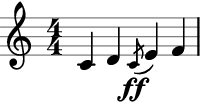
a.play;