Example
a = FoscStaff(FoscLeafMaker().(#[60,62,64,65], [1/8]));
a.consistsCommands.add('Horizontal_bracket_engraver');
a[0..].horizontalBracket;
a.show;
a.format;\new Staff \with {
\consists Horizontal_bracket_engraver
} {
c'8
\startGroup
d'8
e'8
f'8
\stopGroup
}Horizontal bracket can be tweaked.
a = FoscStaff(FoscLeafMaker().(#[60,62,64,65], [1/8]));
a.consistsCommands.add('Horizontal_bracket_engraver');
t = #['bracket-flare', [0,0], 'color', 'red', 'direction', 'up', 'staff-padding', 3];
a[0..].horizontalBracket(tweaks: t);
a.show;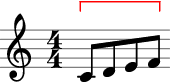
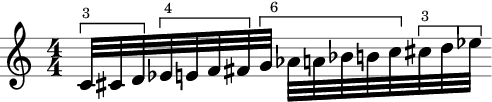
Partition selection by sizes, bracket each new selection, add text annotation.
a = FoscStaff(FoscLeafMaker().((60..75), [1/32]));
t = #[['bracket-flare', [0,0]], ['direction', 'up'], ['staff-padding', 0]];
a[0..].partitionBySizes(#[3,4,6,3]).do { |sel, i|
    sel.horizontalBracket(text: FoscMarkup(sel.size.asString).fontSize(-2), textAlign: -0.8, tweaks: t);
};
a.show;